AI Services Setup
Table of contents
- AI Services Setup
- Overview
- OpenRouter (Multiple AI Models)
- Google Gemini (Free Tier)
- Perplexity API (Web Research)
- API Key Security
- Service Comparison
- What You’ve Accomplished
Overview
Get API keys for AI models and research tools. All services offer free tiers perfect for learning.
Time Required: 10 minutes
OpenRouter (Multiple AI Models)
What is OpenRouter?
Access multiple AI models with one API key. Perfect for comparing different models.
Part 1: Get Your OpenRouter API Key
1.1 Sign Up for OpenRouter
- Visit OpenRouter
- Click “Sign Up” and authenticate with Google or GitHub
- Complete the sign-up process
1.2 Navigate to API Keys
- Go to OpenRouter API Keys
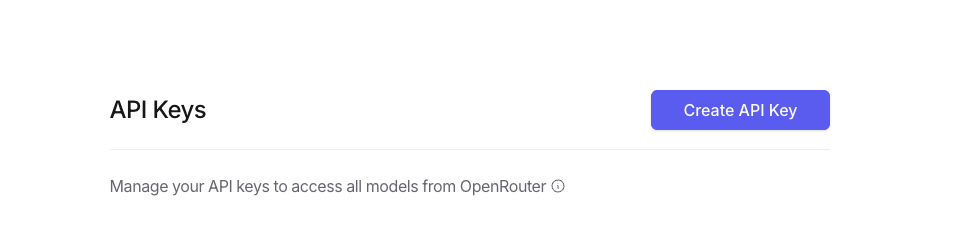
1.3 Create New API Key
- Click “Create API Key” button
- In the modal, configure your key:
- Name:
n8n-exercises(or any descriptive name) - Credit limit (optional): Leave blank for unlimited
- Reset limit every…: N/A
- Expiration: No expiration
- Name:
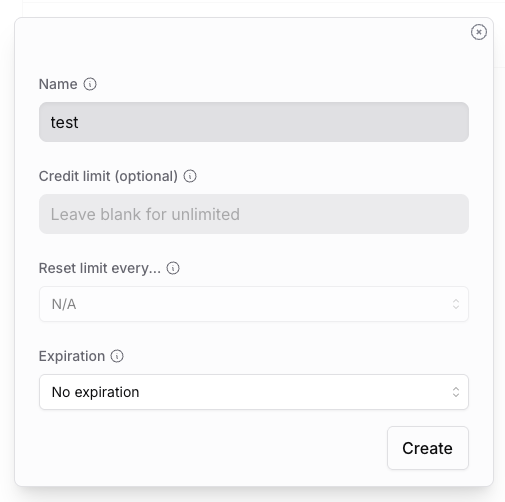
- Click “Create”
1.4 Copy Your API Key
- Your new API key will be displayed (starts with
sk-or-v1-...) - Important: Copy it immediately - you won’t be able to see it again!
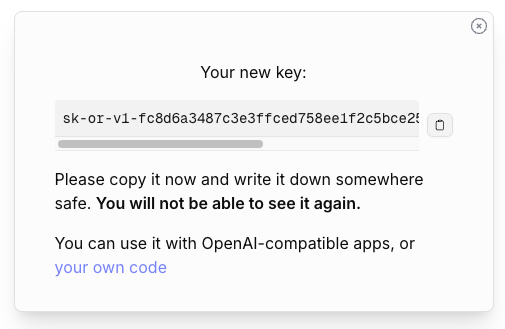
- Save the key securely in your password manager
Critical: This is your only chance to copy the API key. Store it immediately!
Part 2: Add OpenRouter Credential to n8n
2.1 Access Credentials Menu
- In n8n, click the + button in the top-right corner
- Select Credential from the dropdown
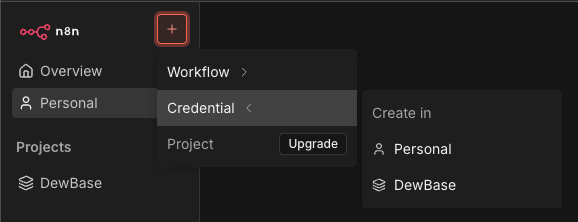
2.2 Search for OpenRouter
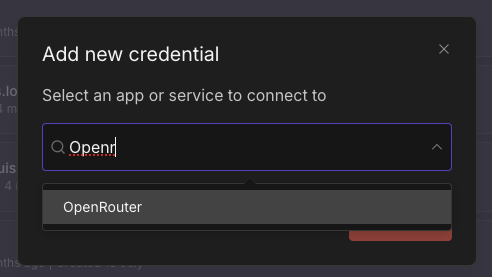
- In the “Add new credential” modal, search for “OpenRouter”
- Select “OpenRouter” from the results
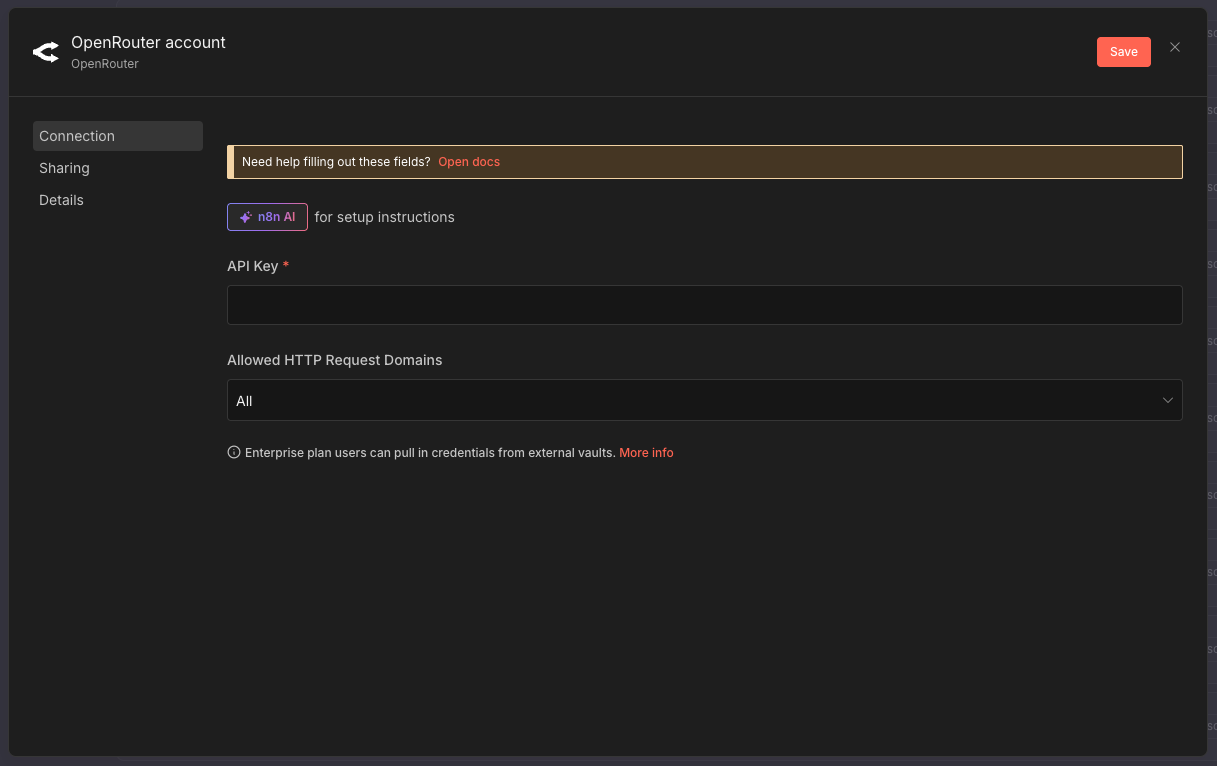
2.3 Enter API Key
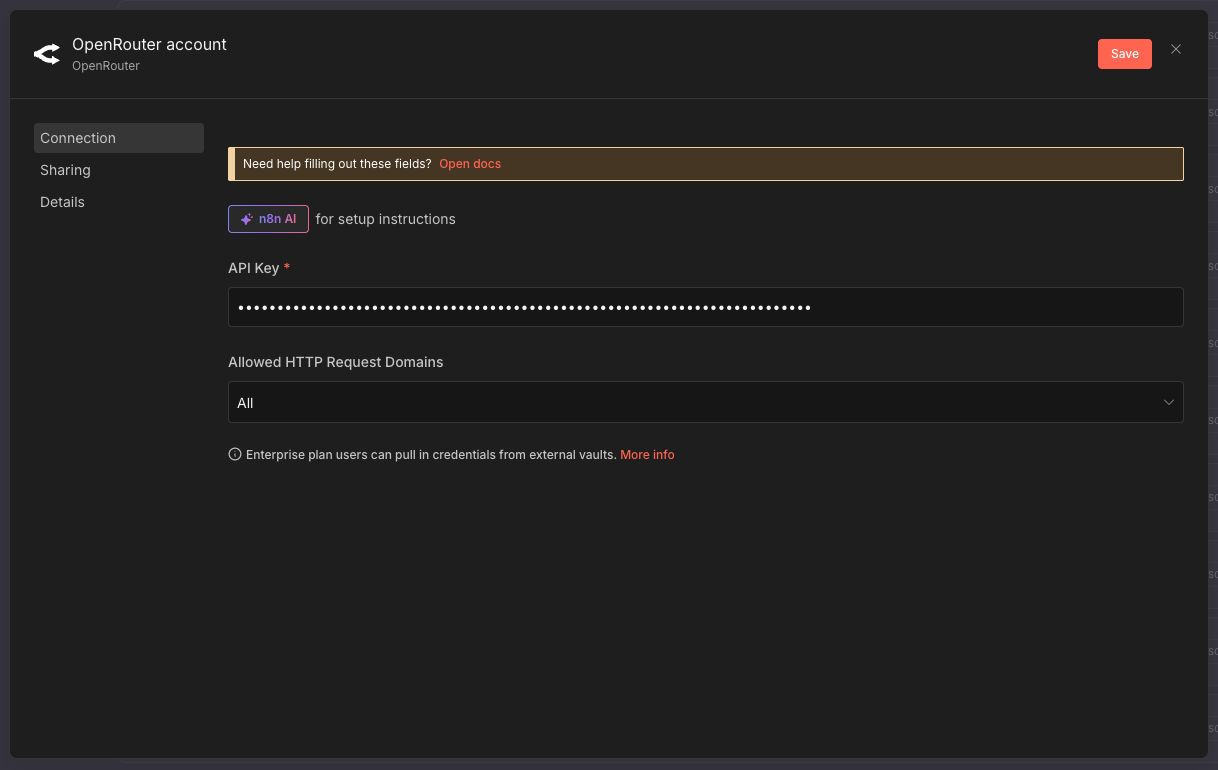
- Paste your API key into the API Key field
- Click “Save”
2.4 Verify Connection
- n8n will automatically test the connection
- You should see “Connection tested successfully” in green
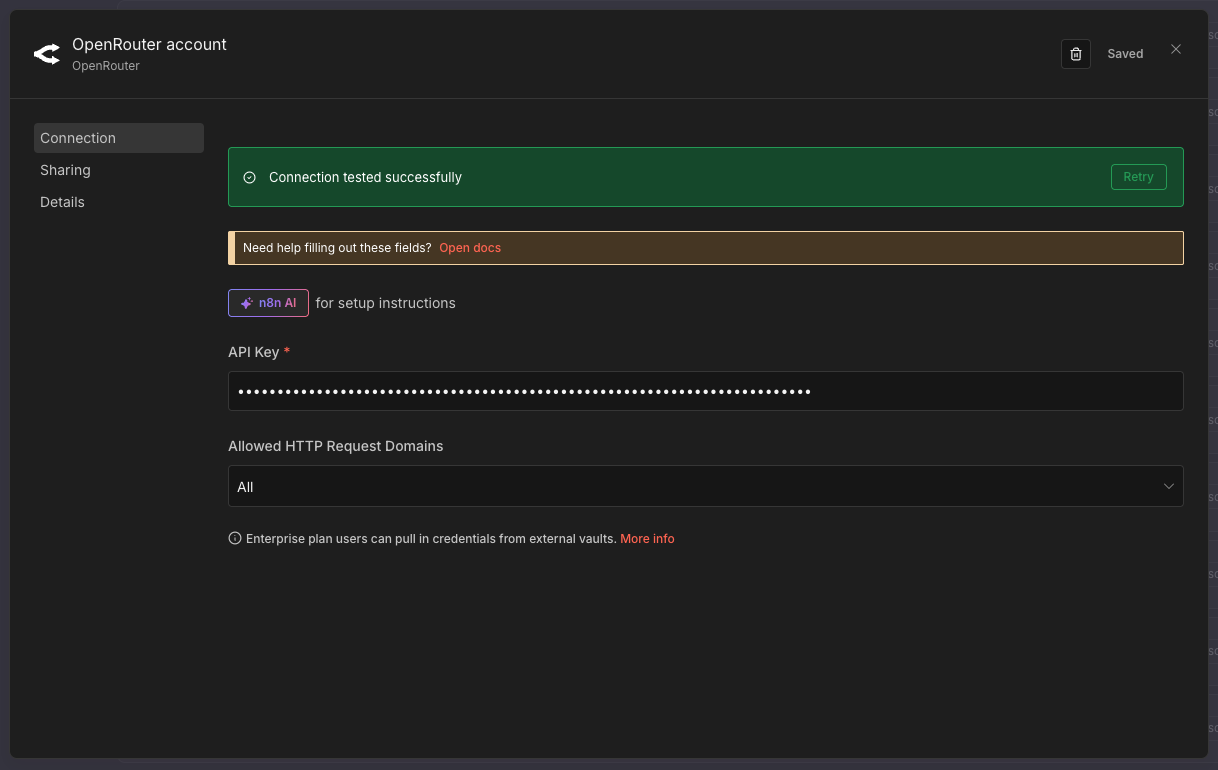
Success: Your OpenRouter credential is now ready to use!
Free Credits
Free Trial: OpenRouter provides $1 free credit. Exercises use minimal credits (~$0.001 per operation).
Recommended Free Models
All models below are completely free to use on OpenRouter. Browse all free models
| Model | Cost | Best For | Speed |
|---|---|---|---|
| meta-llama/llama-3.3-70b-instruct:free | Free | Complex reasoning, high quality | Medium |
| google/gemma-3-27b-it:free | Free | Classification, general tasks | Fast |
| google/gemma-3-12b-it:free | Free | Quick responses, simple tasks | Very Fast |
| mistralai/mistral-7b-instruct:free | Free | Balanced performance | Fast |
| x-ai/grok-4.1-fast:free | Free | Fast inference | Very Fast |
| kwaipilot/kat-coder-pro:free | Free | Code generation | Fast |
Free Models Availability: Free tier models are community-supported and perfect for learning and prototyping. For production use, consider paid models for better reliability and rate limits.
Google Gemini (Free Tier)
Why Gemini?
Google’s Gemini offers generous free quotas perfect for AI agents, complex reasoning tasks, and iterative workflows.
Part 1: Get Your Gemini API Key from Google AI Studio
1.1 Visit Google AI Studio
- Go to Google AI Studio API Keys
- Sign in with your Google account

1.2 Accept Terms of Service
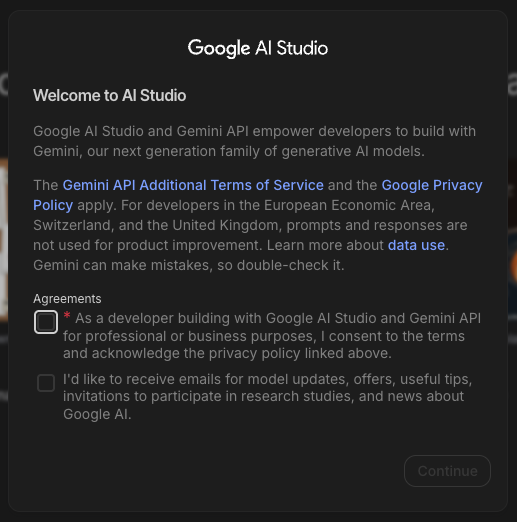
- On your first visit, you’ll see a “Welcome to AI Studio” screen
- Read the Gemini API Additional Terms of Service
- Check the agreement checkbox
- Optionally, check the second box to receive updates
- Click “Continue”
1.3 Create API Key
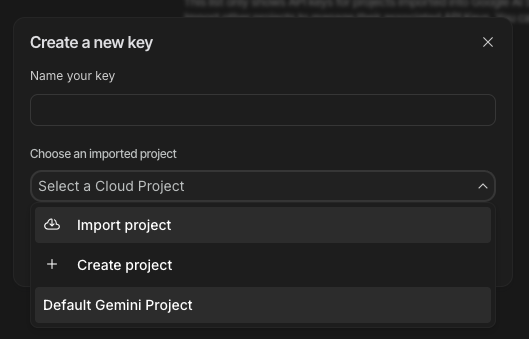
- Click “Create API key” in the top-right corner
- You’ll see a “Create a new key” modal
- Choose “Default Gemini Project” (or create a new project)
1.4 Copy Your API Key
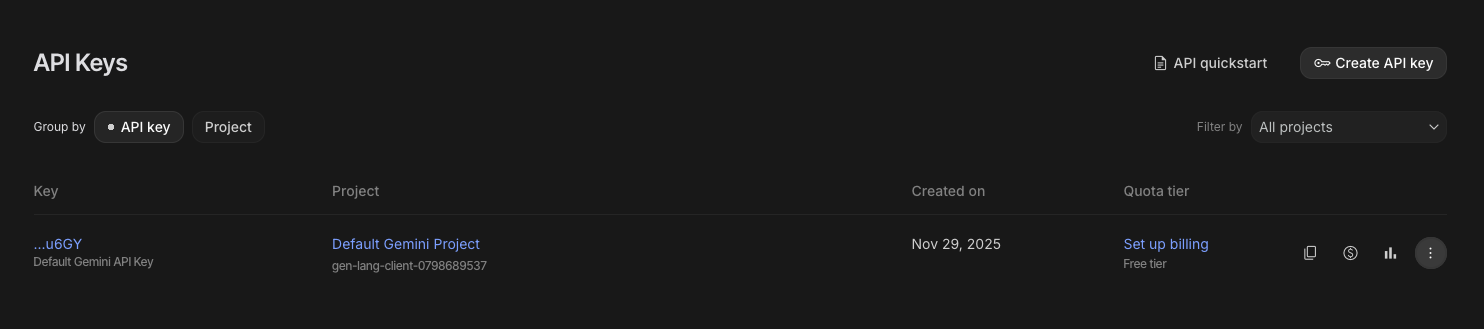
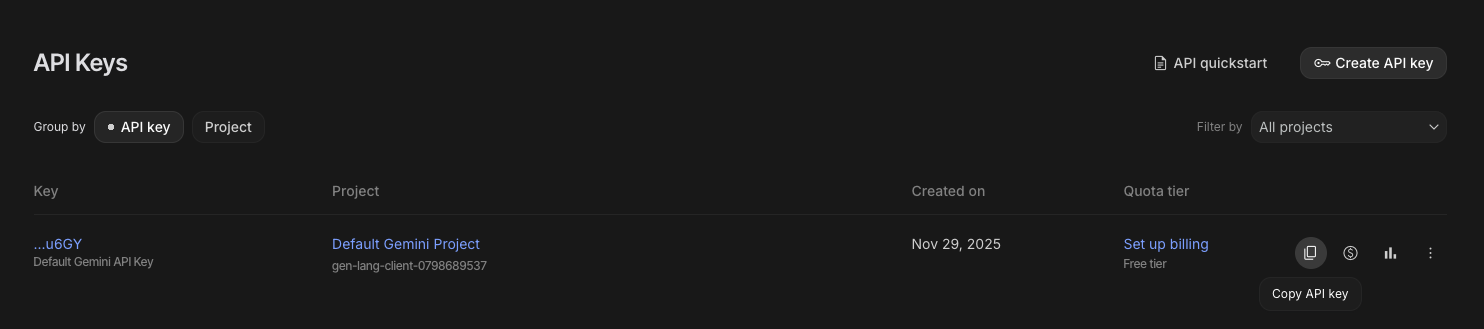
- Your API key will appear in the list (starts with
AIza...) - Click the three-dot menu (⋮) next to your key
- Select “Copy API key”
- Save the key securely in your password manager
Important: Store your API key immediately. While you can copy it again later, keeping it secure is critical.
Part 2: Add Gemini Credential to n8n
2.1 Access Credentials Menu
- In n8n, click the + button in the top-right corner
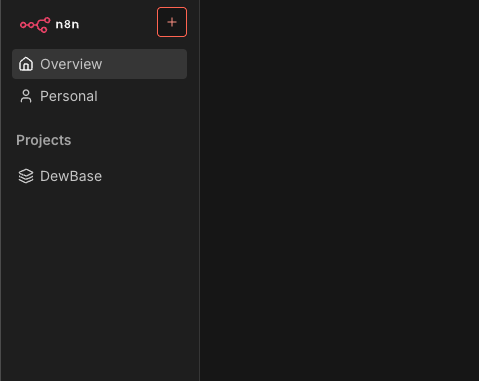
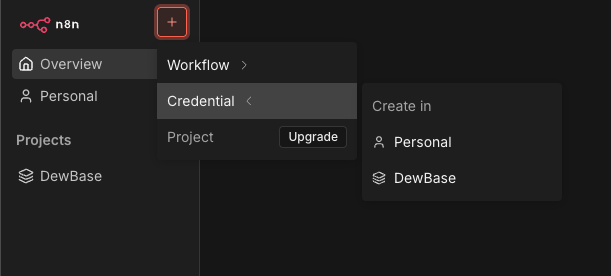
- Select Credential from the dropdown
2.2 Search for Gemini Credential
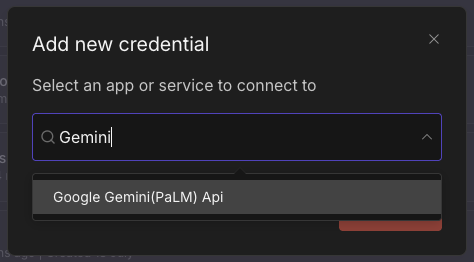
- Search for “Gemini”
- Select “Google Gemini(PaLM) Api”
2.3 Configure Credential
-
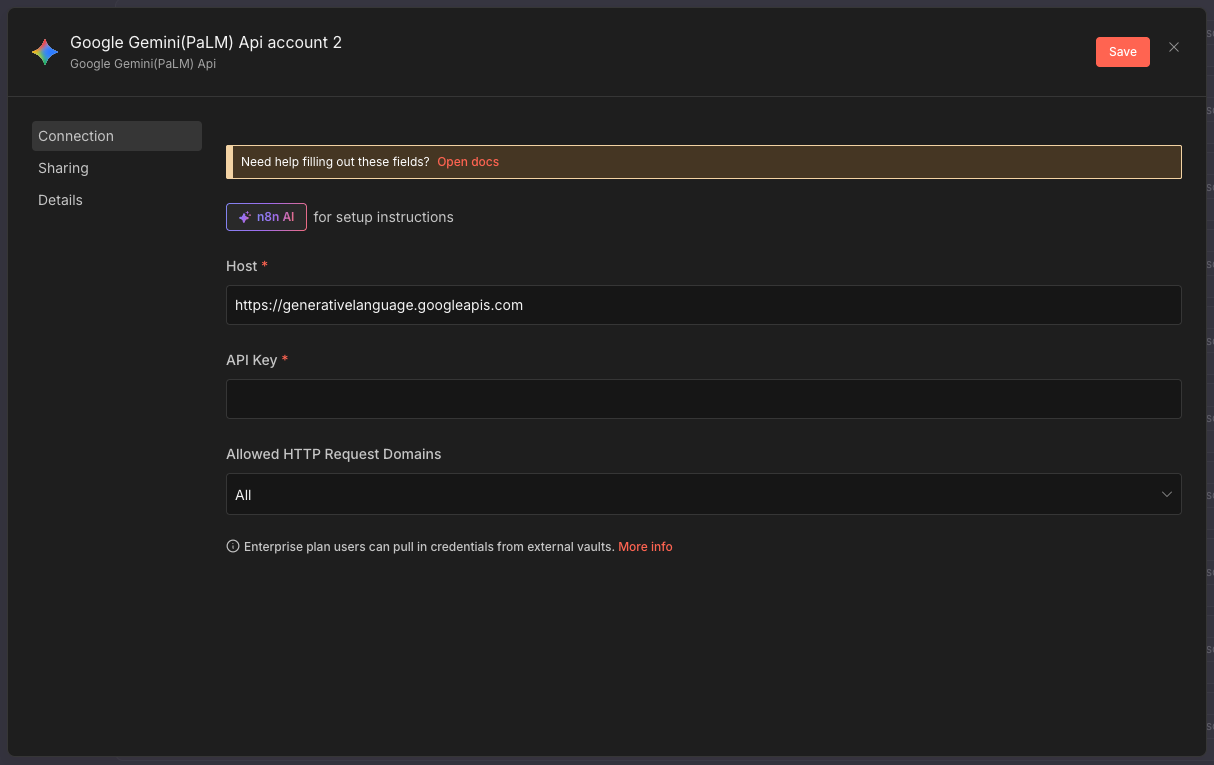
The Host field should already be filled with:
1
https://generativelanguage.googleapis.com
- Paste your API key into the API Key field
- Click “Save”
Success: Your Gemini credential is now ready to use in any workflow!
Free Tier Limits
Generous Free Quota:
- 60 requests/minute
- 1 million tokens/month
- 1,500 requests/day
More than enough for all exercises!
When to Use Gemini
- AI Agents with complex reasoning
- Iterative workflows with feedback loops
- Multi-step content generation
- LLM as a Judge patterns
- When you need consistent, free performance
Gemini vs OpenRouter
| Feature | Google Gemini | OpenRouter |
|---|---|---|
| Free Tier | 1M tokens/month | $1 credit (~100K tokens) |
| Setup | Direct API key | Account + payment method |
| Best For | Learning, prototyping, AI agents | Production, model comparison |
| Quota Reset | Monthly | One-time credit |
Perplexity API (Web Research)
What is Perplexity?
Real-time web search capabilities for your AI agents. Essential for research tasks.
Student Access (Recommended)
Students Get 12 Months Free! Students worldwide can get Perplexity Pro for free for 12 months (worth $240), which includes API credits, unlimited searches, and access to the Comet browser.
To claim your free student access:
- Visit Perplexity Student Program
- Click to verify your student status
- Verify using one of these methods:
- Student email (
.eduor university email address) - Student ID card or documentation upload
- Verification is handled through SheerID
- Student email (
- Get instant access to 12 months of Perplexity Pro
- Bonus: Skip the waitlist for Comet browser
What’s Included for Students:
- 12 months of Perplexity Pro ($240 value)
- Unlimited Quick Searches
- 600+ Pro Searches per day
- Access to advanced AI models (GPT-4, Claude, etc.)
- $5/month in API credits (automatically included)
- File upload and analysis
- Access to Comet browser (AI-powered browser built for students)
Eligibility:
- Available to students globally (US, UK, and international)
- Must verify student status through student email or documentation
- UK students and international students can verify with university email or ID
Part 1: Get Your Perplexity API Key
1.1 Navigate to API Keys
- Go to Perplexity API Keys
- Sign in with your Perplexity account (use your student account if eligible)
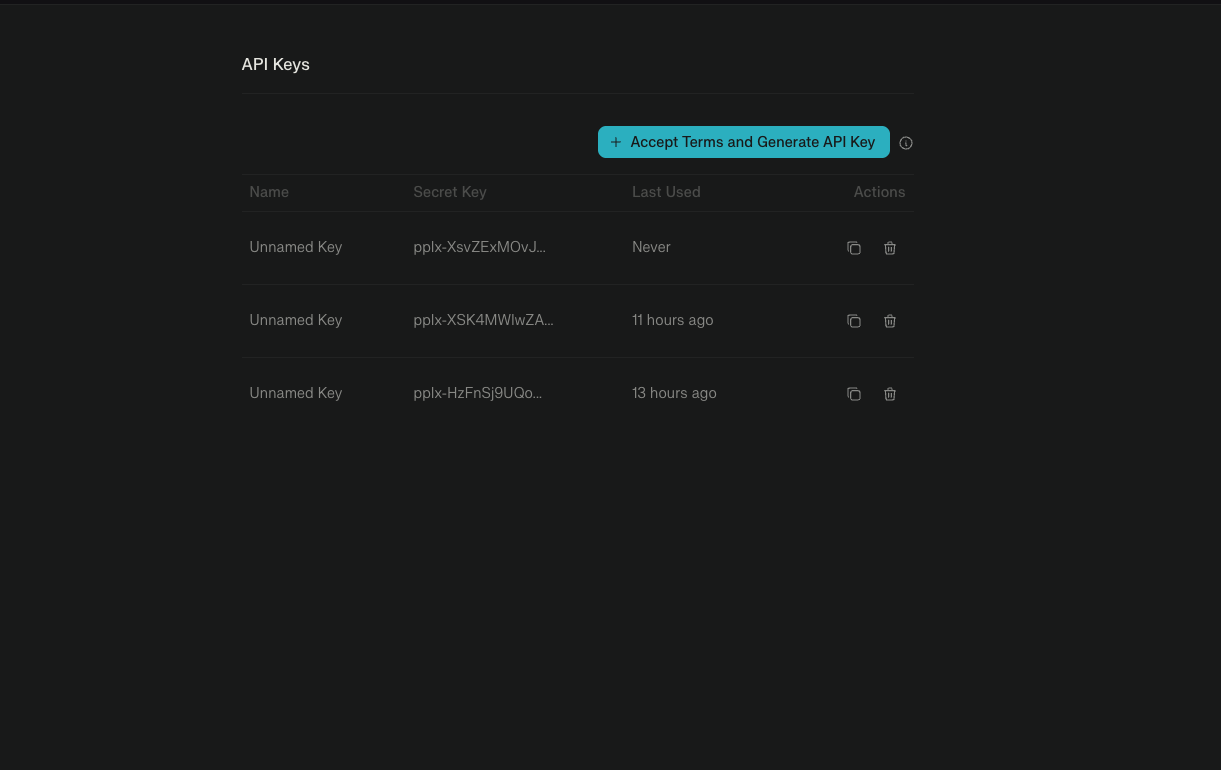
1.2 Accept Terms and Generate Key
- Click “Accept Terms and Generate API Key” button (first time only)
- For subsequent keys, click ”+ Accept Terms and Generate API Key”
1.3 Create API Key
- In the “Create API Key” modal, enter a descriptive name:
- Key name:
n8n-research(or any descriptive name)
- Key name:
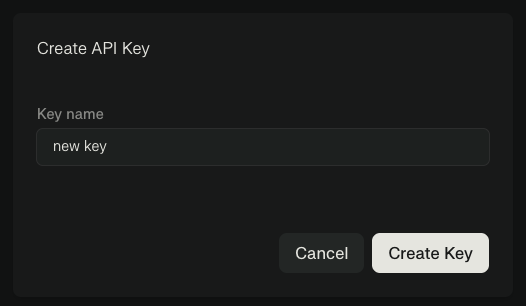
- Click “Create Key”
1.4 Copy Your API Key
- Your new API key will appear in the list (starts with
pplx-...) - Click the copy icon to copy the key

- Save the key securely in your password manager
Important: Store your API key immediately. You can copy it again later from the list.
Part 2: Add Perplexity Credential to n8n
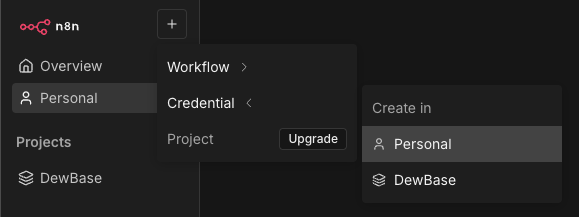
2.1 Access Credentials Menu
- In n8n, click the + button in the top-right corner
- Select Credential from the dropdown
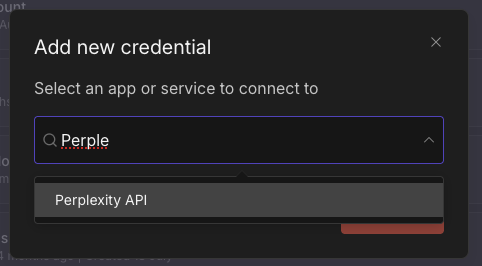
2.2 Search for Perplexity
- In the “Add new credential” modal, search for “Perple”
- Select “Perplexity API” from the results
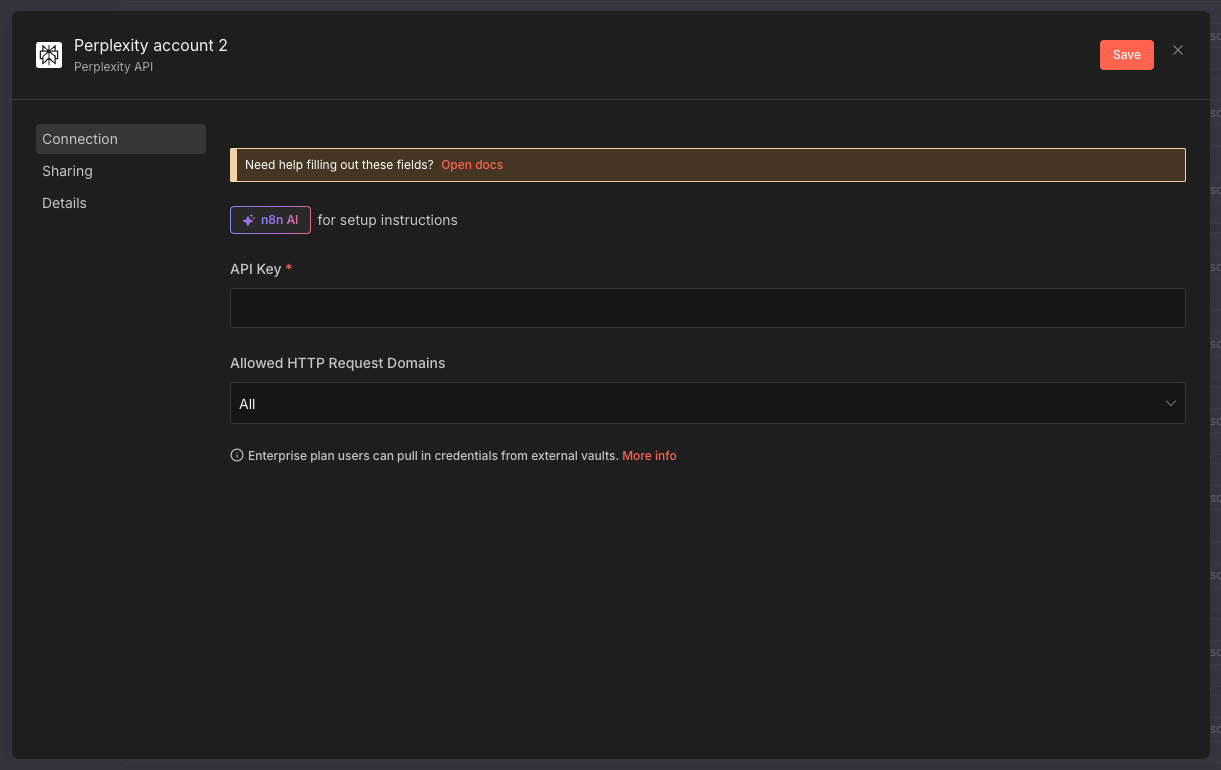
2.3 Enter API Key
- Paste your API key into the API Key field
- Click “Save”
2.4 Verify Connection
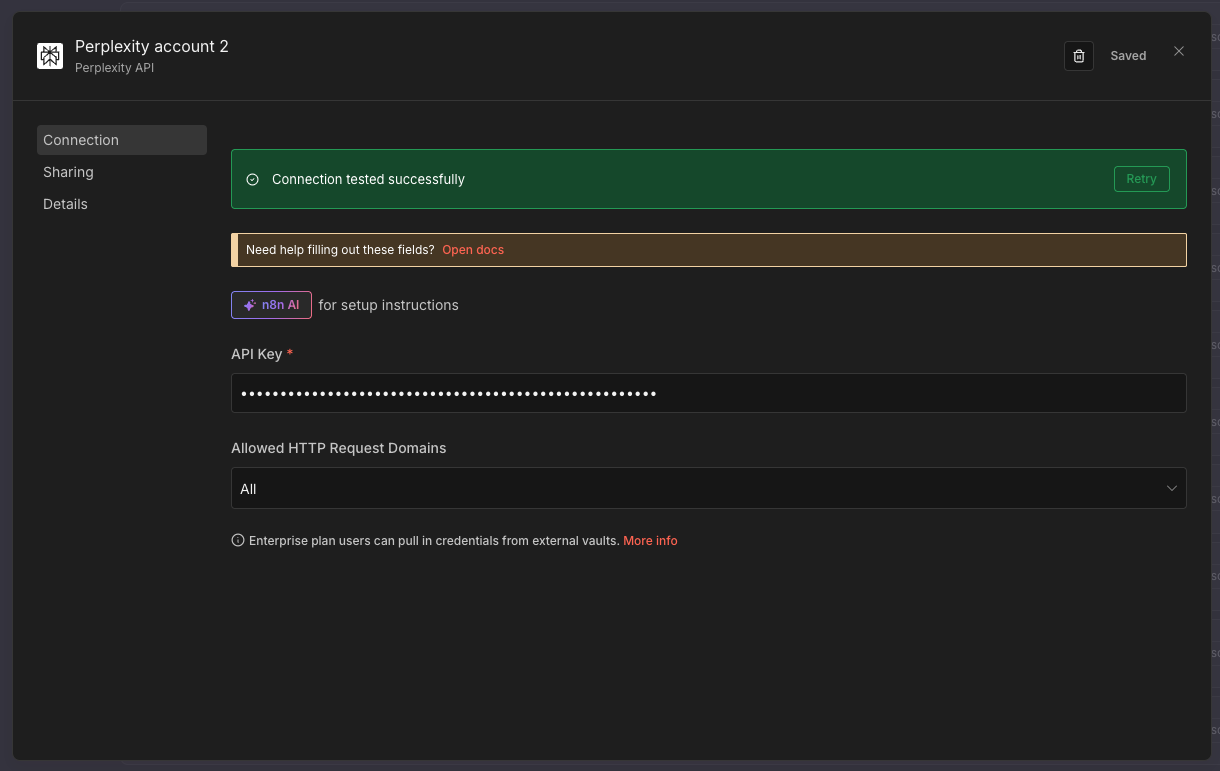
- n8n will automatically test the connection
- You should see “Connection tested successfully” in green
Success: Your Perplexity credential is now ready to use for web research!
Free Credits
Monthly Credits: $5 free monthly (~1000 searches) - resets each month! Students get this automatically with Pro access.
Available Models
| Model | Use Case | Speed |
|---|---|---|
| Sonar | Basic research, fact-finding | Fast |
| Sonar Pro | Complex queries, reasoning | Medium |
| Online Models | Real-time web data | Fast |
API Key Security
Best Practices
- Never share API keys in screenshots or support requests
- Store securely in password manager
- Don’t commit to git - use .env files
- Rotate regularly - every 90 days
- Monitor usage - set up alerts
Quick Security Check
- Keys stored in password manager
- No keys in code repositories
- Usage alerts configured
- Test/production keys separated
Service Comparison
Which Service for What?
| Need | Use This Service | Why |
|---|---|---|
| Email classification | OpenRouter (Gemma) | Free, fast, simple |
| Content generation | OpenRouter or Gemini | Flexible options |
| AI agents | Google Gemini | Free tier, powerful, consistent |
| Web research | Perplexity | Real-time data access |
| Complex reasoning | Gemini or Claude | Better understanding |
| Iterative workflows | Google Gemini | Good for feedback loops |
| Quick tests | Free models | No cost, fast iteration |
What You’ve Accomplished
✅ OpenRouter API key obtained ✅ Google Gemini API configured ✅ Perplexity API ready ✅ Understand which service for which task ✅ Keys stored securely